I built a real-time chat app, and here’s what it taught me!
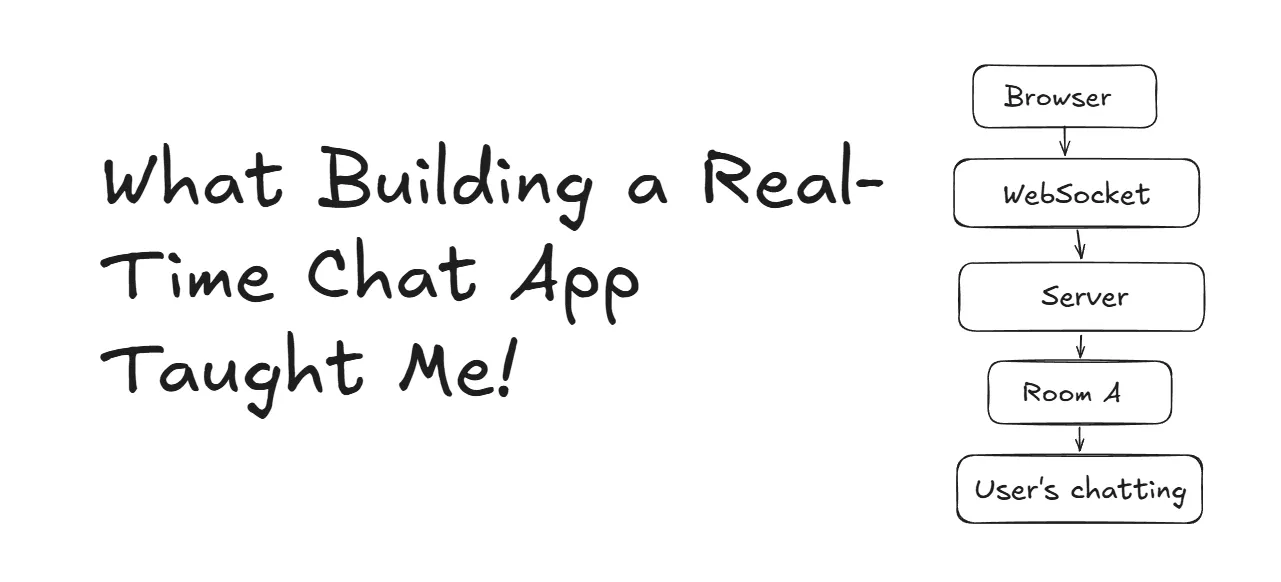
So hello everyone, this is going to be my first blog, so I am going to write about the experience which I had and basically the learnings which I got when I was building and tackling the errors while building the chat app.
So a few weeks back I was learning about WebSockets, and then I thought, why not build a chat app with it? And I decided to build a chat app that is room-based, which means users can join rooms and talk to each other, and the chat gets deleted when all the users leave the room.
So building the backend was easy enough for me, but when I was building the frontend, I got through so many errors and bugs, which leads to so much learning for me.
Now I am going to explain what I’ve learned and what are the bugs, errors, and edge cases are that I’ve gone through and solved.
1. How WebSocket servers are different from HTTP servers?
When we work with HTTP servers, then all things are very simple: you just send a request to the server, and then the server understands it and then sends back a response according to the request, and your work is done.

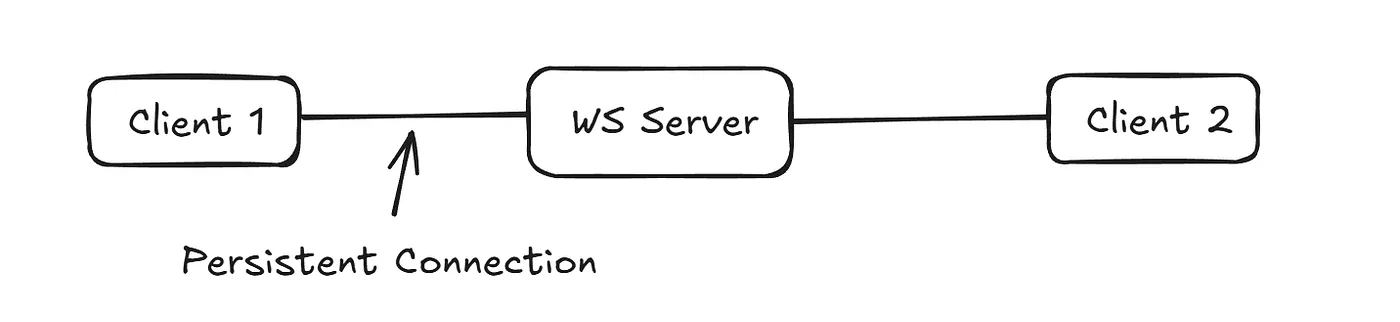
But in real-time apps, when we work with WebSocket servers, there is a persistent connection between the client and the WebSocket server, which means once the client is connected to the server, then it can continuously send requests and receive responses, and other clients can also connect to the same WebSocket server and send requests and receive responses and interchange information between each other.
It’s like a phone call; once connected, then data can flow continuously from both sides.
This establishes the main idea of the chat: how we can make a chat application.
2. The bugs which occurred while building were mostly timing bugs
Now I am going to explain the timing bugs one by one and how I solved them.
1. Message sent before socket connection opened
At first, when I was working with WebSockets, I thought writing this line of code

means we are connected to the WebSocket, but that’s not true. It means that we created a WebSocket connection. Now the connection will start, and connecting to a WebSocket server can take time, and during the connecting phase, if we send a join message, then the join message will not get sent, and a bug will occur.
So how do we fix this?
That’s when the WebSocket states come into the picture. A WebSocket connection has 4 states:
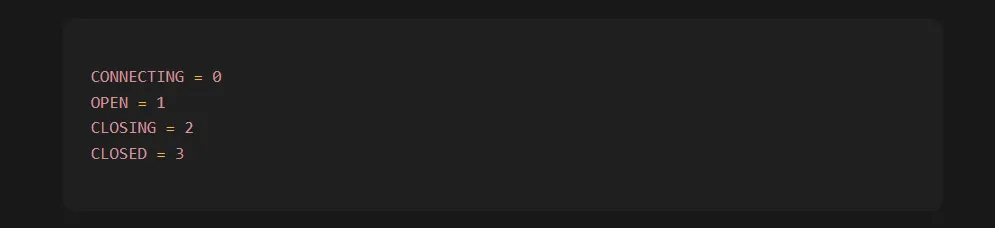
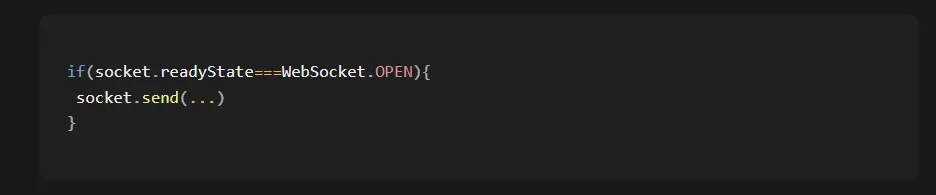
We should check the WebSocket connection state before sending the message. Here, open means the WebSocket connection is established, and now you can send the message.
Here’s the example code of how you can check:
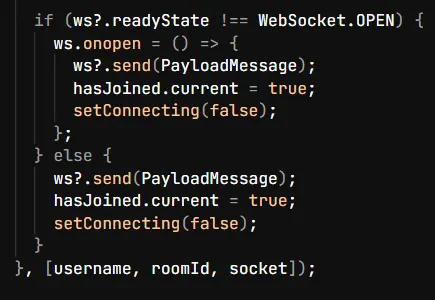
There’s one more thing also: there is an onopen listener, which you can attach to the socket, and it will restrict the socket from sending a join message until the WebSocket is opened.
Here is the code in which you can see I’ve attached the onopen listener, and then I am sending the join message.
2. onmessage listener attached too late
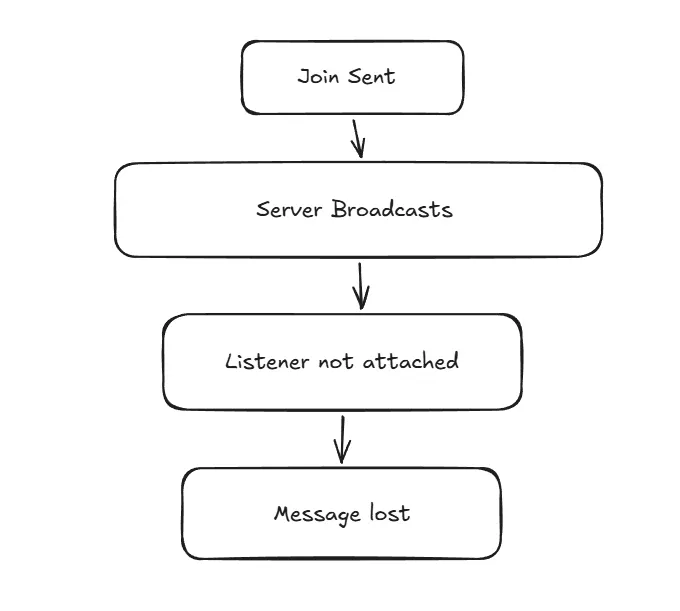
When the user joins the room, there is a message sent of joining into the chat room that this person has joined the room, but whenever someone joins, that message is not showing.
But why?
It happens when you forget to add an onmessage listener before someone sends the join message. Without an onmessage listener, how will the socket receive the messages and broadcast them?
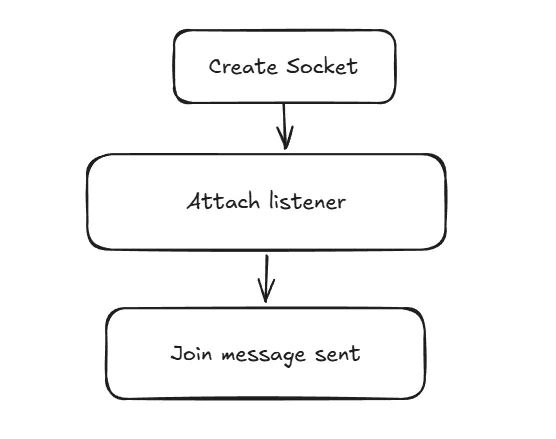
So here’s how we should solve it when we create a new WebSocket server: we should first check if the connection of the WebSocket server is created and opened or not, and then we should attach the onmessage listener before sending the join message so that if any message comes, then it should listen to it.
Here is the code that I’ve written to solve this:
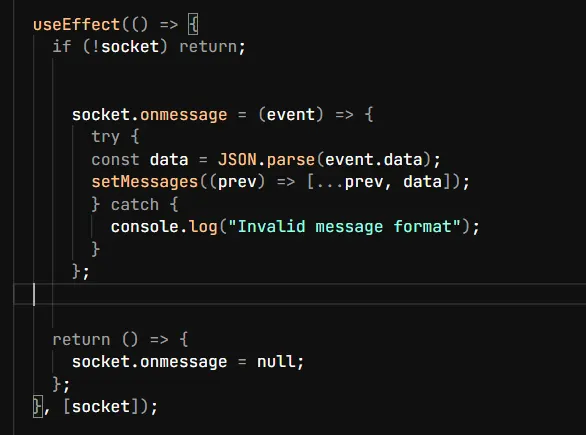
Here you can see I attached the onmessage listener when the socket is created and opened and then send the message so that the onmessage listener catches the messages and stores them into the message state variable so that I can broadcast them in the chat room.
3. Duplicate joins
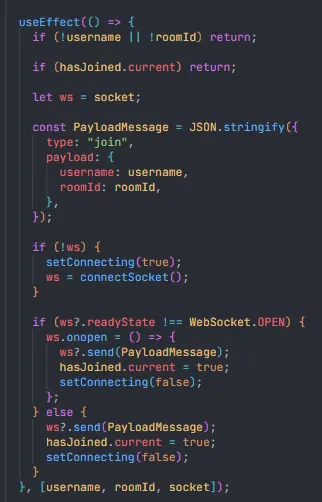
When the user joins the room, then it sends a join message when the useEffect runs on page mount, but due to the strict nature of React, the page renders two times and the join message is sent two times, and there are two joined messages received, which is not ideal and can cause performance issues.
Due to this, there can be duplicate entries in the room, which is not good.
So here’s how I solved it: I created a hasJoined ref variable, which gives a boolean value, and I added it in the useEffect after the join message is sent so that whenever a user sends a join message, the useRef turns to true, and then when the effect reruns, the hasJoined ref variable stops it from sending the join message again.
Here is the code that I’ve written to solve this:
3. useRef finally clicked
I know about useRef deeply while working on this project.
When I was creating the socket connection, I tried to store it first in a state variable using the useState hook, but when I was listening to messages after creating the socket connection, the messages didn’t get delivered, like I didn’t see the joining room message of myself when I joined the room.
It happened. Why?
It happened because when I was saving the socket instance using the useState hook, the setSocket took time to set the socket, and because it holds asynchronous properties, before the socket variable got set, the message was already sent and couldn’t be listened to by the socket. That’s why I was not able to see the join messages.
Then I came to know that why useRef is used and what is the difference is between useRef and useState.
useRef immediately updates when something is assigned to it; that’s why it is best for storing WebSocket instances, and it survives rerenders also. Because of this, I don’t have to reconnect the socket again and again; the socket connection stays persistent across the rerenders.
useState should store the things that need rerendering and create UI updates, and storing WebSockets in state variables is not relevant because they don’t need any UI updates.
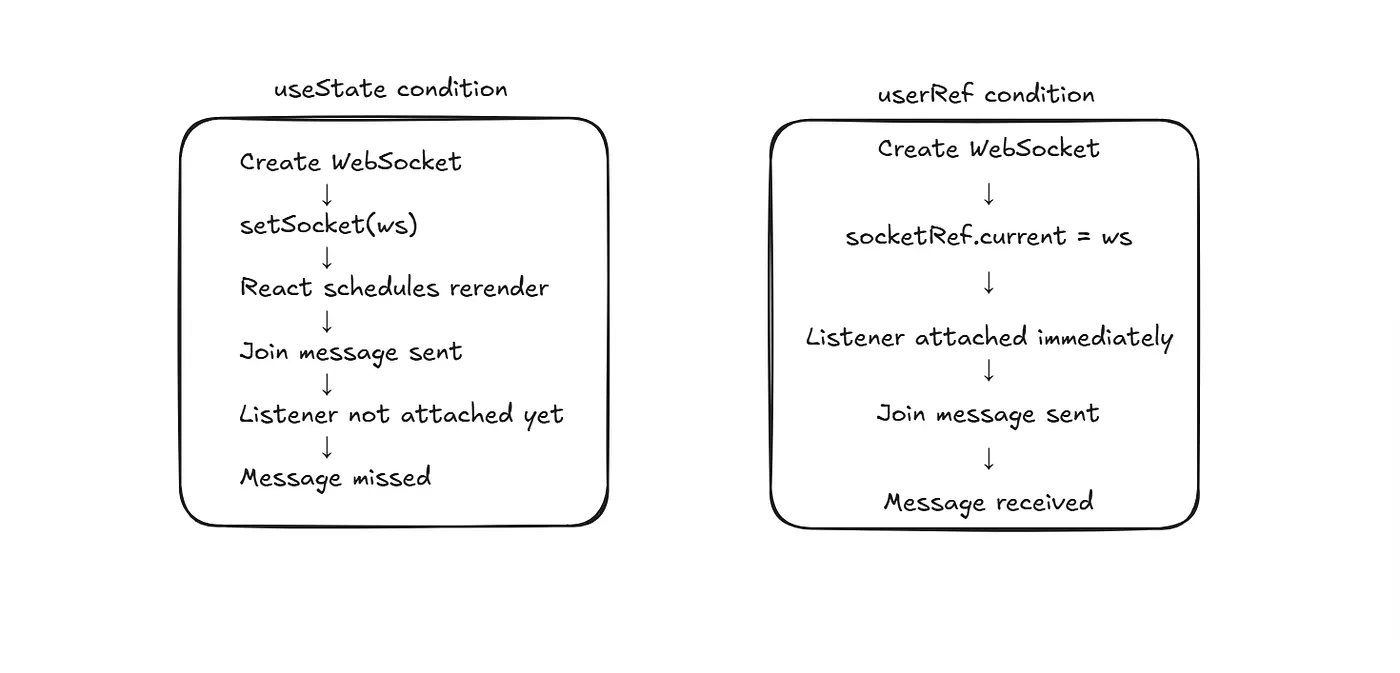
The things that I learned here are that not everything should be stored in a state.
4. Refresh doesn’t update your app
When you refresh the chat app, it doesn’t update your app; it clears all the state variables, refs, and sockets. Basically, it creates a new fresh app with no state and no data.
So the problem that occurred here was that when someone refreshes their app or the app gets refreshed accidentally (internet connection off), then they get disconnected, and their username, room name, and socket connection all get lost.
So how do they connect again?
The simple answer is to go back and write the username and room name and join again. Wouldn’t this be a tedious task?
So how do I solve it?
Here comes the concept of runtime memory and persistent memory.
Runtime memory does not survive a refresh, and all the state, sockets, and variables are stored in it; that’s why they get destroyed on refresh.
Persistent memory survives refresh, and it doesn’t get destroyed on refresh, and examples of persistent memory are localStorage, cookies, and databases.
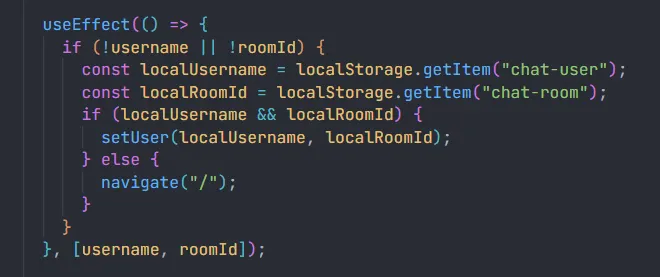
So for solving this refresh problem, I stored the username and room name in the localStorage, and then whenever the useEffect runs when the page mounts, it first checks the localStorage for the username and room name and gets the username and room name from there and sends the join message, which eliminates the extra task of going back and again typing the username and room name.
Here is the code which I’ve written to solve this:
So that’s it. There are more things there that I can write here, but I’ve written only the important things that I thought were important; otherwise, this blog will become so long and you will get bored while reading it.
This was my first blog, so if you want to give any suggestions and advice to improve my writing, you can give them to me.
Most of the bugs and errors were timing bugs related to React lifecycle events and race conditions, and solving these made my React concepts better than before.
If you want to learn more about this project or understand it deeply, you can see its GitHub repo.
GitHub repo link: https://github.com/amannv/Chat-Application
Here is the live link also if you want to use this with your friends.
Live link: https://chat-application-brown-one.vercel.app/
That’s it for this blog. Hope you enjoyed it, and thank you for reading this blog.
I’m going to write more blogs from now on because I had so much fun writing this blog.
Thanks for reading!